Animation Events
Animation events are implemented in the form of a component buffer that is filled by the animation processing engine. Events should be defined in Unity's animation configuration dialog:
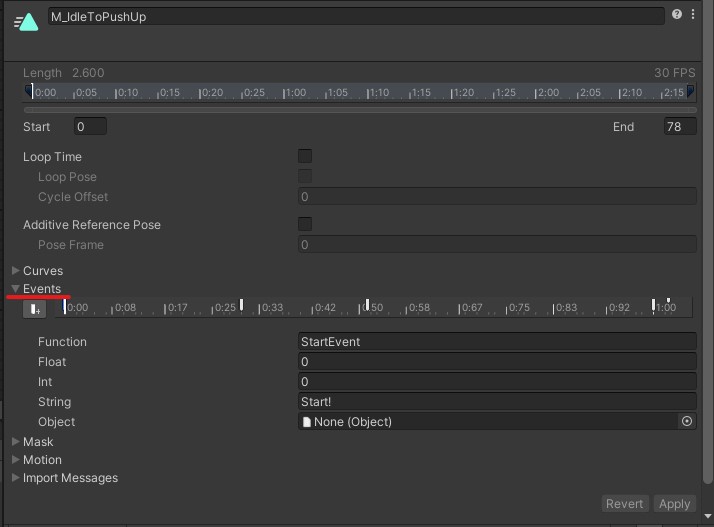
Animation event properties are translated into the following package component (field excerpt; do not redeclare it in your project):
public struct AnimationEventComponent: IBufferElementData, IEnableableComponent
{
    public uint nameHash;
    public float floatParam;
    public int intParam;
    public uint stringParamHash;
}
- nameHash - contains a hash value of Unity's animation event
Functionfield. It is calculated byFixedStringExtensions.CalculateHash32()helper function. - floatParam - contains authoring animation event
Floatfield. - intParam - contains authoring animation event
Intfield. - stringParamHash - contains a hash value of authoring animation event
Stringfield. It is calculated byFixedStringExtensions.CalculateHash32()helper function. TheObjectfield of the authoring event is ignored.
Rukhanka Animation refreshes the buffer each animation update. Read it after RukhankaAnimationSystemGroup to handle the current update's events. Do not clear it from a consumer: other systems may need the same events. If gameplay needs to retain an event, copy its values into your own data before the next update.
This example logs events after they are emitted:
using Rukhanka;
using Unity.Entities;
using UnityEngine;

[UpdateInGroup(typeof(SimulationSystemGroup))]
[UpdateAfter(typeof(RukhankaAnimationSystemGroup))]
public partial struct LogAnimationEventsSystem : ISystem
{
    public void OnUpdate(ref SystemState state)
    {
        foreach (var events in SystemAPI.Query<DynamicBuffer<Rukhanka.AnimationEventComponent>>())
        {
            foreach (var animationEvent in events)
                Debug.Log($"Animation event {animationEvent.nameHash}, int parameter {animationEvent.intParam}");
        }
    }
}
For name comparisons, use CalculateHash32() from Rukhanka.Toolbox on the authoring function or string name. Unity's Animator.StringToHash is a different hashing API. In production, replace logging with the appropriate ECS gameplay request. Clip events are data, not automatic calls to MonoBehaviour methods named in the clip.
Enabling Animation Events
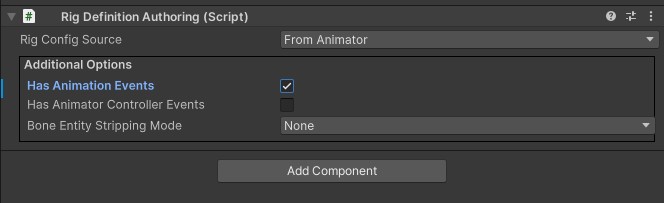
By default, the animation events component buffer is not added to the animated entity. RigDefinitionAuthoring has a checkbox named Has Animation Events which orders to add AnimationEventComponent buffer to the rig entity at the baking stage.